
Configuring CPIX v2 with Broadpeak Packager
This section is a guide to configuring the Broadpeak packager for CPIX v2 with document signing.
The packager model used for this integration test was BKS350 v03.11.11.
To communicate using CPIX v2 protocol between Broadpeak and Streamkeeper Multi DRM using document signing, you will need:
- A service access key of type CPIX v2 created in the Multi DRM portal
- A public signing certificate generated from the service access key's private key
- The Streamkeeper public signing certificate, used by Broadpeak to verify the signature on all incoming CPIX v2 signed responses. Streamkeeper signs those responses with the corresponding private key and uses the same key across all accounts. The certificate is included in the section "To Prepare the Streamkeeper Public Signing Certificate" below.
To Create the Service Access Key
- Log into your Streamkeeper Multi DRM Portal account.
- Under the Multi DRM menu, select Service Access Keys and click the + Add a Key button in the top right corner.
- Add an Issuer Name of your choice.
- In the Scope dropdown, select CPIX V2.
- In the Public Key Type dropdown, select RS256 or RS512.
- Click Generate Key.
- Click Save.
The Multi DRM system creates your service access key and displays it on screen, with the issuer, customer access key ID, and private key. - Copy the private key and save it in a plain text file named
cpix_customer_key.pem.
To Create the Public Signing Certificate
Use the CPIX v2 service access private key to create a public signing certificate. If you do not have the key, follow the steps in "To Create the Service Access Key" above.
- On the command line, enter the following command:
openssl req -new -key cpix_private_key.pem -x509 -days 3650 -out cpix_customer_cert.pem - Fill in the company information. Since this goes on the packager side, this is the customer information.
After this step you should have a public signing certificate file namedcpix_customer_cert.pem.
To Prepare the Streamkeeper Public Signing Certificate
You also need the public certificate used by the Streamkeeper CPIX service to sign all outgoing signed CPIX v2 responses. Broadpeak requires this to be configured to validate the signatures of CPIX v2 responses received from the Streamkeeper CPIX service.
Create a plain text file called cpix_kms_cert.pem.
Paste the following certificate into the file and save it:
\-----BEGIN CERTIFICATE-----
MIIFejCCA2ICCQDr3cXCnbJ0xDANBgkqhkiG9w0BAQ0FADB/MQswCQYDVQQGEwJVUzELMAkGA1UECAwCQ0ExEjAQBgNVBAcMCVNhbiBEaWVnbzETMBEGA1UECgwKVmVyaW1hdHJpeDEWMBQGA1UECwwNTXVsdGlEUk0tQ29yZTEiMCAGA1UEAwwZY3BpeC5tcmRybS52ZXJpbWF0cml4Lm5ldDAeFw0yMjA1MzExNDUxNDBaFw0zMjA1MjgxNDUxNDBaMH8xCzAJBgNVBAYTAlVTMQswCQYDVQQIDAJDQTESMBAGA1UEBwwJU2FuIERpZWdvMRMwEQYDVQQKDApWZXJpbWF0cml4MRYwFAYDVQQLDA1NdWx0aURSTS1Db3JlMSIwIAYDVQQDDBljcGl4Lm1yZHJtLnZlcmltYXRyaXgubmV0MIICIjANBgkqhkiG9w0BAQEFAAOCAg8AMIICCgKCAgEAxobkBdYNRdLzhUH9a6e7PJs7iRRjuSJPqbvZpES28h9+aWJNpC6A4FvBCv3wdk95YI6J1FUf+XlhSocTtZ7oTdBPdbm5E4Wyu3RR3nbxq7CyvJHp7ewbHV4kEUW7biF402SPXHnXCFeCOOyFozafoXbZUHY7pe9/FaqzffUz7F8BR/E3eC7otKDloVgWfEEIgP7+senpUUSNZ5A/UPEbR1efbh29Z/THjPcqg34ym9mg9gJHOoPF21fc3G/RoISSYnFf6Bi1+wDCwZbTaoOaXMdtQe0ha0XtCdmkXD8IUIc2CEbHlA75oqQiZbryx6ZdyRUKgyeVZcWg36UQ5Sj9X3wmqNQAMSASi+5aRgJ2L61n9AkCePdVzeJE0qP+Jr10JufpHXVDKEJeKLhOrHkuK/Ulquqqq4xAZ0aSn1+veb8MTDA79D+taCCJn935w+23hQWiziRQPdJvu0u90HxtNA/uNPklHcCt1Kezk2uEv9F8ONwAuKNtLdeQtnUP4ZzjNitUhIhyHooOWkZhcy3M3LFS36CUJhwhfnNDwidPeJy6GR+cdeafhNYVWkkrYGl3rXJWOJTbwPxT699t7gfeaU9bldUG9xlsvy5pOFyhyTYOq10zIJ33UMH1UKH1EDJvGu+mLQG7SNugSaurz/3G15DffePI1S6EpFbTQ9/flTsCAwEAATANBgkqhkiG9w0BAQ0FAAOCAgEAZHd6M4v8wsoCDrqRks5RN/CjofozPhFPMJyo/WgLP2CP9geh7EsV5TIPsrydKYhHPTzpYVmX9lkGxn8rJ7t4vhrQyR9SYyjRGq343j2/ucWwZ6zkBkg7OaEUC6rJ5NRmbMGqCCf4ha4zAUIw+whijErWP5Op87X9GGhL/bAe2hCVaR0JfwW1dbRpW0D6oCYalTEONqJptEmfmXk9LwinofZfEGPLJIq2qkN02BH0DF6XlWRhiARYGmISW9dcSU6bavIr8hhd3X2eYH7wm1TKmsrZG1u+Ua0SBVmkxrAlJcO58TDQeudVkTOiauG33IOIBXtQgZvWGOkoRXTWUkM7+BgdAL/SBY9PA/aKu6/11gj0/ZTKDBOzovjlN8rxxLA5zUoWK0OnQKzfUsGuICAdzPaQHm3MXrWnRm61xJtZ0J0WBm16ijC2s/MLl2xh9mC367D9Jy8YZHciAvhcxDeocpfAjziQmWMN80YPvNhKF/q4DmkDST9kW9Dhz4/f/YvcxmiFc/+34A5kbHOGdeL/zzNiHaOCkrWE8uo4bpCFluZ+DbTw/mOAZRTCrxAnevXJrZc+LP9ZlK7zERaBGylsS4jpBVlZTEF1kXnVNDeSN486fFoF3tpokF4jgFdfU1xI6fmfHS31rOZ0aFp/rzGEws0lgCdW/wKOh0asirEY5AU=
\-----END CERTIFICATE-----
You should now have the following files ready to add to the Broadpeak packager:
cpix_customer_key.pem
cpix_customer_cert.pem
cpix_kms_cert.pem
To Add the Key and Certificates to the Broadpeak Packager
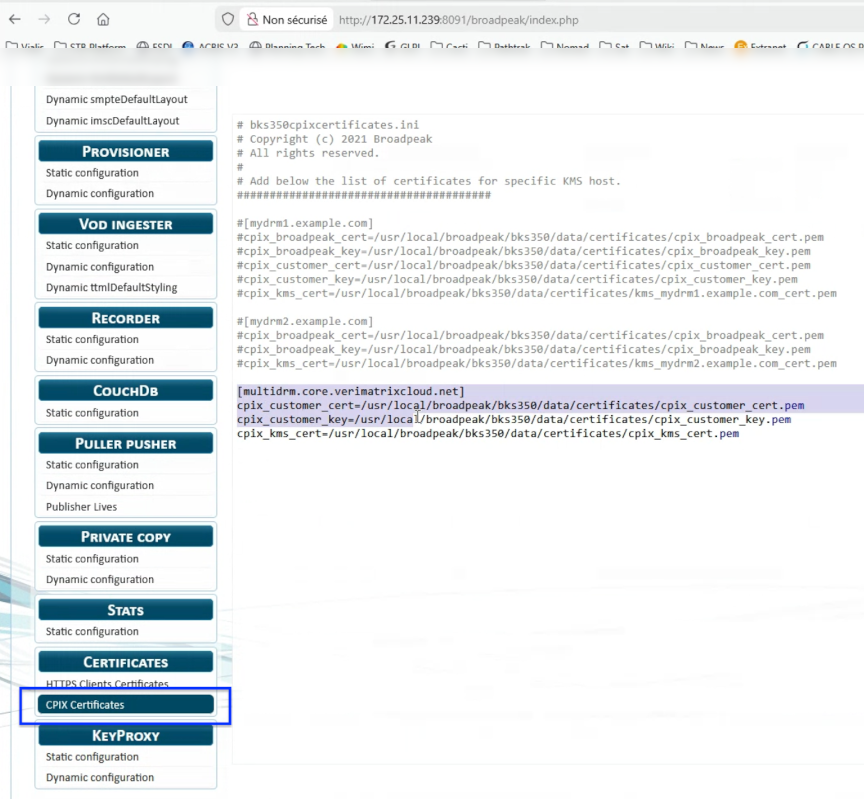
- Navigate to Settings → Certificates → CPIX Certificates. Find the commented-out sample configuration that looks like:
# [mydrm3.example.com]
# cpix_customer_cert=/usr/local/broadpeak/bks350/data/certificates/cpix_customer_cert.pem
# cpix_customer_key=/usr/local/broadpeak/bks350/data/certificates/cpix_customer_key.pem
# cpix_kms_cert=/usr/local/broadpeak/bks350/data/certificates/cpix_kms_cert.pem- Change the configuration to:
[multidrm.core.verimatrixcloud.net]
cpix_customer_cert=/usr/local/broadpeak/bks350/data/certificates/cpix_customer_cert.pem
cpix_customer_key=/usr/local/broadpeak/bks350/data/certificates/cpix_customer_key.pem
cpix_kms_cert=/usr/local/broadpeak/bks350/data/certificates/cpix_kms_cert.pem
The following screenshot shows the new configuration:
-
Copy
cpix_customer_key.pe,cpix_customer_cert.pem,cpix_kms_cert.pemto the Broadpeak packager under/usr/local/broadpeak/bks350/data/certificates/ -
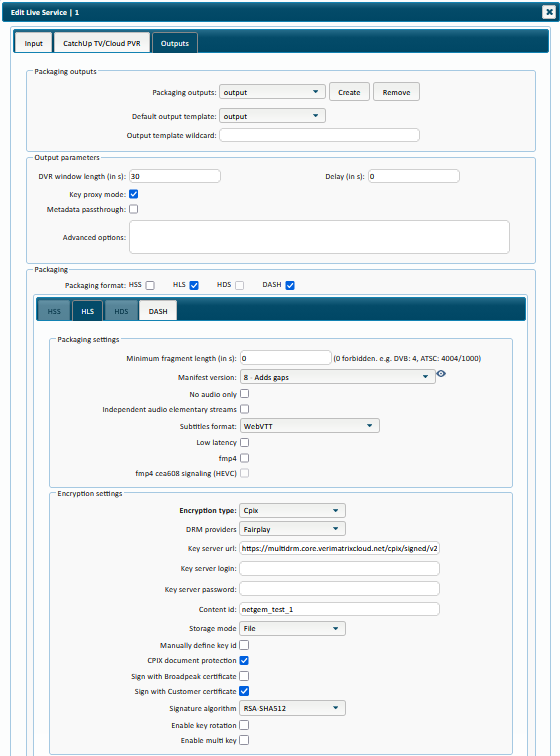
Under Live Service > Outputs > Output parameters:
Check the box for Key proxy mode.
📝 NOTE This step is essential to see the CPIX configuration in the encryption settings below.
- Under Live Service > Outputs > Packaging:
Select HLS and/or DASH.
Under the HLS and/or DASH tabs, apply the following settings:
- Encryption type: Cpix
- DRM providers: FairPlay for HLS or Widevine/PlayReady for DASH
- Key server URL:
https://multidrm.core.verimatrixcloud.net/cpix/signed/v2.3?kid=<kid>&iss=<issuer>&sub=<subject>
where:- <kid>: The service access key identifier
- <issuer>: The service access key issuer
- <subject>: The content identifier
- ContentID: Enter the content identifier of the encrypted stream. Use the same value as the “sub” (subject) parameter in the CPIX endpoint.
- CPIX document protection: checked
- Sign with Broadpeak certificate: unchecked
- Sign with Customer certificate: checked
- Signature algorithm: RSA-SHA512
The following screenshot shows this configuration:
- Start encryption of the live stream.
Updated 1 day ago